


MetaTrader 4 and MetaTrader 5 are Windows programs. On a Linux VPS they run through a compatibility layer that lets Windows software run on Linux, and the one MetaQuotes itself documents for both terminals is Wine. For EAs written in MQL, including those from the MQL5 Market, this means the terminal you know, on a cheaper operating system. What needs a check before you choose Linux is everything outside MQL: EAs that load Windows DLLs, separate Windows programs and other trading platforms.

What MetaQuotes says about MetaTrader on Linux
The MetaTrader 5 help says "the platform runs on Linux using Wine", and describes Wine as "a free compatibility layer that allows application software developed for Microsoft Windows" to run on Unix-like systems (MetaTrader 5 help, Installation on Linux). The MetaTrader 4 help says the same about the MT4 terminal (MetaTrader 4 help, Installation on Linux).
| Point | MetaTrader 4 | MetaTrader 5 |
|---|---|---|
| How it runs on Linux | Through Wine | Through Wine |
| Install script from MetaQuotes | Ubuntu, Debian | Ubuntu, Debian, Linux Mint, Fedora |
| Extra packages | Mono and Gecko, "required for platform operation" | Same |
| Where the terminal is installed by default | .mt4/drive_c/Program Files/MetaTrader 4 in your home folder | .mt5/drive_c/Program Files/MetaTrader 5 in your home folder |
| Advice | Always use the latest versions of the operating system and Wine | Same |
Two consequences follow. First, the terminal is the Windows terminal, not a separate Linux edition: the charts, the Navigator, the Strategy Tester and the MQL code are the ones you use on Windows. Second, there are two things to keep updated instead of one: MetaTrader itself, and the Linux system with Wine underneath it. MetaQuotes gives sudo apt update ; sudo apt upgrade to update Wine and says timely updates increase the platform's stability.
What that means in daily use
| What you run | On a Linux VPS | What to check |
|---|---|---|
EAs and indicators written in MQL4 or MQL5 (.ex4, .ex5) that call no DLL | They run inside the terminal, like on Windows | The same checks as on Windows |
| EAs bought on the MQL5 Market | Installed from the terminal's Market, as on Windows | The Market rules forbid DLL calls in Market products (IV.2), so the DLL question does not arise. MetaQuotes' activation pages say nothing about Linux: check the available activations on the product page after each install |
| EAs that call a DLL | Depends on the DLL | Ask the vendor whether the EA is supported under Wine; if the answer is "Windows only", take Windows |
| Separate Windows programs next to MetaTrader (an external trade copier, a news filter, a spreadsheet link) | Each one is its own question under Wine | Ask the vendor of each program |
| Other platforms such as NinjaTrader or TradeStation | MetaQuotes' Linux instructions cover MetaTrader only | Read that platform's own system requirements |
| Files and folders | Wine gives each installed program its own virtual drive with Windows-style paths, inside your Linux home folder | A file you download in Linux has to be copied into the terminal's folders on that drive before MetaTrader sees it |
| Several terminals | One installation per terminal, as on Windows | The platform limit of the plan, and RAM for your charts |
In short: the closer your setup stays to "MetaTrader plus MQL code", the less Linux matters. Each extra Windows component is one more thing to confirm with whoever made it.
What a preinstalled desktop saves you
A Linux VPS sold as a plain server often comes with a command line only: no desktop, no MetaTrader. To run MetaTrader on one, you do it yourself:
- Install a graphical desktop and a remote-desktop server, so that you can see and click in MetaTrader.
- Download and run MetaQuotes' install script from a terminal window: for MetaTrader 5 one script covers Ubuntu, Debian, Linux Mint and Fedora, for MetaTrader 4 there is one for Ubuntu and one for Debian. The MetaTrader 5 help says to start it without administrator rights (no
sudo); it asks for your account password, installs a matching Wine package, then downloads and runs the platform installer. - Agree when you are asked to install the Wine packages Mono and Gecko, then finish the installer. For MetaTrader 5 the help says to restart the operating system afterwards.
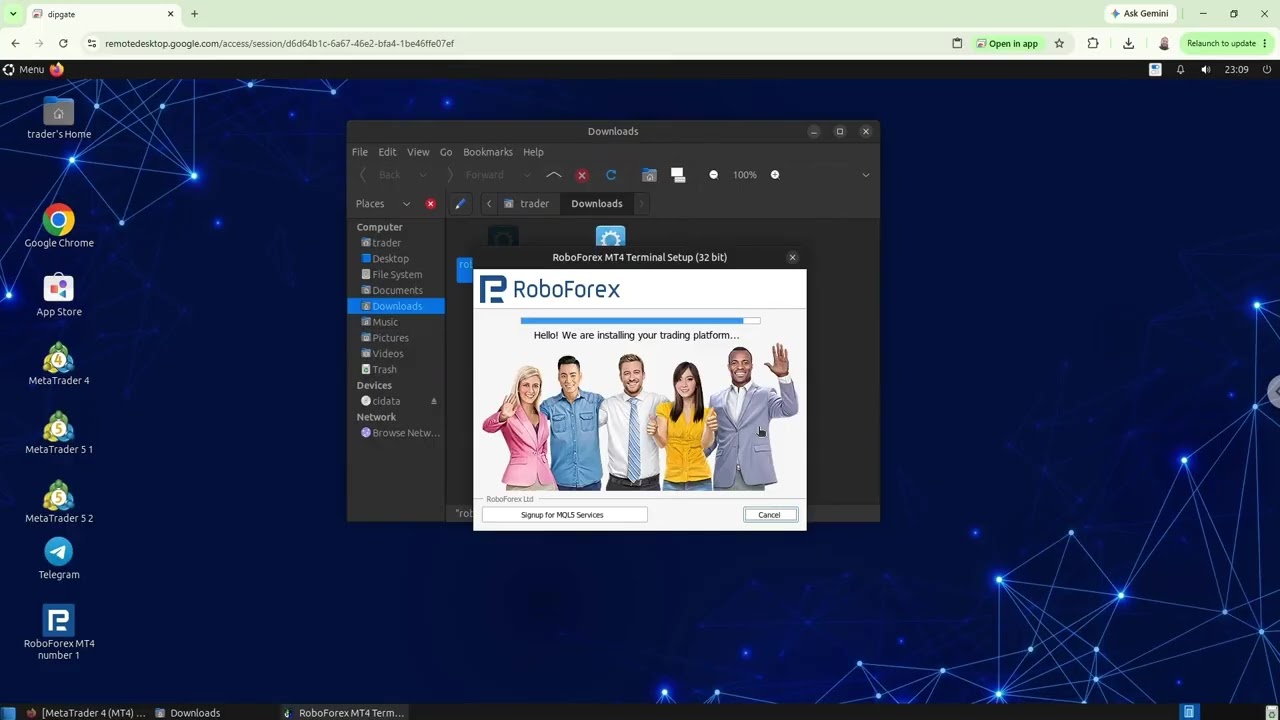
- To use your broker's own MetaTrader build, run the broker's Windows installer with Wine, then log in to your account.
- Keep the system and Wine updated from then on.
A preinstalled desktop skips steps 1 to 3 for the first terminal: you connect and MetaTrader is already there.
| Bare Linux VPS | Metatrader VPS (Dipgate) | |
|---|---|---|
| Desktop | You install one | Ubuntu desktop |
| MetaTrader | You install it with Wine | Preinstalled |
| Remote access | You install and secure it | Chrome Remote Desktop, in Chrome or with the phone app |
| Your broker's MT4 or MT5 | You install it | You install it; Dipgate has a tutorial for it |
| Other software | Anything you can install | Ubuntu software store or .deb files |
| Fits | People who run Linux servers already | Traders who want MetaTrader on Linux without the setup |
On Metatrader VPS you connect with the form in the client area. Dipgate's first tutorial, recorded on Metatrader VPS (Linux), covers that step:

The second, also recorded on Metatrader VPS (Linux), covers adding your broker's terminal:
Linux or Windows: decide by your setup
| Your situation | Linux VPS | Windows VPS |
|---|---|---|
| MT4 or MT5 with MQL EAs only | Fits; on Dipgate the Linux plans cost less (no Windows licence to pay) | Fits |
| EAs from the MQL5 Market | Fits | Fits |
| The EA vendor says "Windows only" or the EA calls a DLL the vendor does not support under Wine | No | Yes |
| A Windows program next to MetaTrader | Only if its vendor supports Wine | Yes |
| A platform other than MetaTrader | Only if that platform's vendor supports Linux; Dipgate names no platform other than MetaTrader for Metatrader VPS | Check the platform's requirements; Dipgate's Trading VPS lists NinjaTrader, TradeStation, MultiCharts and ProRealTime from Silver up |
| You want to connect with an ordinary RDP client | Not on Metatrader VPS (Chrome Remote Desktop) | Yes |
| You manage the computer from a phone or a Chromebook | Chrome Remote Desktop works in Chrome and on the phone app (MT4 on a Chromebook) | Needs a Remote Desktop app |
The comparison of Windows VPS, Linux VPS and a browser MetaTrader puts the three Dipgate products and their plans side by side.
A sizing example on Metatrader VPS
Three MT4 accounts and two MT5 accounts, MQL EAs only, nothing else on the server: five terminals. Metatrader VPS Bronze allows up to 4 trading platforms, so it is one short. Metatrader VPS Silver allows up to 8, at $14.92/mo billed annually ($179 a year) or $17.90 monthly, and leaves three free for later. Those are plan limits, not a measurement: how much RAM and CPU the five terminals use depends on the EAs and on how many charts each one keeps open, and Silver has 12 GB DDR5 and 6 CPU for them.
When a Linux VPS is not the right choice
- Your vendor requires Windows. Do not try to prove the vendor wrong on a live account. Take Windows.
- Your setup depends on Windows tools. Each one would need its own check under Wine, and the time spent can cost more than the price difference.
- You want RDP. Metatrader VPS is reached with Chrome Remote Desktop only.
- You run one MetaTrader account and want no desktop to manage. A browser MetaTrader or MQL5 Virtual Hosting may be simpler (MQL5 Virtual Hosting vs your own VPS).
How this works on Dipgate
Metatrader VPS is "a full desktop with MetaTrader already installed", running on Ubuntu instead of Windows. You open it with Chrome Remote Desktop from a computer or a phone; login data arrive in the welcome email.
| Plan | CPU (as written) | RAM | Disk | Trading platforms | Monthly | Per month, billed annually |
|---|---|---|---|---|---|---|
| Metatrader VPS Bronze | 4 CPU | 8 GB DDR5 | 100 GB SSD | up to 4 | $11.90 | $9.92 |
| Metatrader VPS Silver | 6 CPU | 12 GB DDR5 | 200 GB SSD | up to 8 | $17.90 | $14.92 |
| Metatrader VPS Gold | 8 CPU | 24 GB DDR5 | 300 GB SSD | up to 16 | $29.70 | $26.40 |
- EAs go on "from a file or straight from the MQL5 Market"; other software from the Ubuntu software store or
.debfiles. - Dipgate's reason for the lower price: "No Windows licence to pay: more RAM and CPU for less."
- Locations at order: Europe, United Kingdom (+$2.00) or New York (+$2.00).
- For Windows-only software Dipgate points to its Windows product, Trading VPS.


